
Temporary Email for Developers: Workflows, Tips, and Edge Cases
If you build software that includes sign-up, onboarding, email verification, password resets, invites, or notifications, you already know the uncomfortable truth: email is part of your application’s security surface and your product experience. It’s also one of the easiest places for test environments to get messy fast.
That’s why more teams are adopting temp mail (temporary/disposable inboxes) as part of their developer workflow. With the right approach, best temp mail setups help you:
- Run sign-up and verification tests repeatedly without “polluting” real inboxes
- Create realistic end-to-end flows (magic links, OTP codes, reset links)
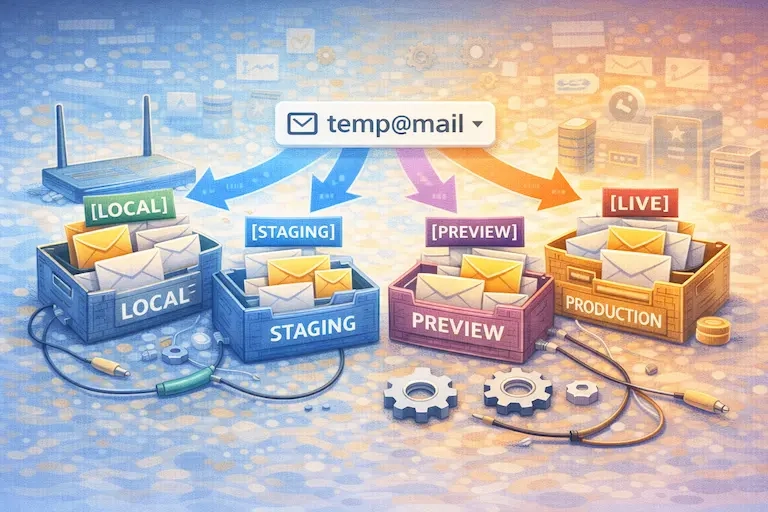
- Isolate identities per environment (local/staging/preview)
- Keep QA runs clean, fast, and reproducible
But temp mail isn’t a magic switch. In real systems, you’ll hit edge cases: domain restrictions, rate limits, verification loops, flaky email delivery, and retries that can turn “simple automation” into a test maintenance nightmare.
This guide explains practical workflows and how to handle the gotchas—while keeping it SEO-friendly for the key terms: best temporary email, best temp mail, and temp mail.
1) Automating sign-up tests without polluting real inboxes
Why temp mail fits developer reality
In development and QA, you typically need many accounts—often created and destroyed quickly:
- Repeated onboarding runs
- Regression tests for verification and reset emails
- Demo data generation
- CI pipelines that run multiple times a day
- Integration tests that validate email content and links
If you use real email accounts for this, a few things go wrong almost immediately:
- Inboxes fill up and become impossible to reason about
- Tests accidentally re-use old verification links
- Multiple concurrent test jobs race for the same inbox
- Cleanup becomes a chore nobody enjoys (and then nobody does)
A temp mail workflow avoids that by making each test run feel like a brand-new user with a brand-new inbox.
What “best temp mail” means for automation (developer definition)
When developers search “best temp mail,” they often mean:
- API access (create inbox programmatically)
- Reliable receiving (not “maybe it arrives, maybe not”)
- Message search (find the latest verification email)
- Extraction helpers (pull OTP codes, links)
- Controllable expiry (auto-delete inboxes after runs)
- Predictable performance for CI
Some providers explicitly document “throwaway/temporary inboxes” for testing to avoid test pollution and clean up automatically.
A realistic E2E flow to automate
A stable, high-value E2E scenario usually looks like this:
- Create a unique inbox (temp mail) for the test run
- Sign up in the app with that temp mail address
- Wait for verification email
- Extract the verification link or code
- Complete verification in browser automation
- Continue onboarding and assert “account is active”
- Optional: Trigger password reset and validate reset flow
- Clean up test data / expire inbox
OWASP emphasizes the importance of testing registration and password reset flows because they’re core identity and authentication pathways. The OWASP Forgot Password Cheat Sheet is also a strong reference for what secure, user-safe reset flows should look like.
Tip: In your article, you can naturally mention that best temporary email tools support these flows without requiring “real inbox management.”
2) Managing multiple identities across environments
A common developer pain: you’re not testing one system. You’re testing three to five “worlds”:
- Local development
- Staging
- Preview deployments (per PR)
- Production (sometimes with a sandbox mode)
- Vendor sandboxes (payments, CRM, identity providers)
Using the same email identity across those worlds creates ambiguity:
- Which environment sent this email?
- Did staging verify the same user as preview?
- Is this password reset pointing to the right host?
A clean identity strategy (that doesn’t become over-engineered)
A practical approach is to standardize identities like this:
- Temp mail identities for disposable flows (sign-up tests, previews, throwaway demo accounts)
- Dedicated testing emails for long-lived accounts that must persist across weeks (more on that in section 4)
- Environment tagging inside subject lines or templates (e.g.,
[staging]Verify your email) so humans and tests can disambiguate quickly
Even if you use temp mail, having environment tags in your emails makes debugging faster when something goes wrong.
Avoiding “identity collision” in test databases
Many systems enforce uniqueness by email. If you re-run tests and the previous user still exists, you’ll get failures.
Temp mail helps because each run gets a fresh address. But you still want deterministic cleanup when possible:
- Automatic DB cleanup for test tenants
- Account deletion endpoints for test environments
- TTL policies for test users
This is also where “best temp mail” tools shine: short-lived inboxes that expire after the test run reduce leftover artifacts on the email side.
3) Handling rate limits, verification loops, and retries
This is where real-world testing gets interesting.
Rate limits: the silent CI killer
If your CI pipeline creates many accounts quickly, you may hit:
- Application-level rate limits (sign-ups per IP per minute)
- Email provider throttling
- Anti-abuse heuristics from third-party auth providers
- “Too many requests” responses that appear randomly
Temp mail doesn’t cause rate limiting, but it exposes it—because automation is consistent and fast.
A practical developer response is to pace and isolate:
- Introduce a controlled pacing strategy in test suites
- Re-use a limited pool of identities in some tests (not all)
- Mark high-cost tests as nightly instead of per-commit
- Use queues so multiple CI jobs don’t slam the same endpoints at once
Verification loops: when “verify email” never completes
A loop typically happens when:
- The verification token is created, but the verification endpoint fails
- The token is invalidated too early
- Multiple emails are sent and the wrong link is clicked
- The client resends verification repeatedly due to a UI state bug
Temp mail makes this easier to reproduce because you can inspect the inbox history for a single run. The key is to write tests that select the correct email:
- Pick the newest message matching a subject pattern
- Ignore older messages
- Ensure you’re using the link from the right environment (host validation)
OWASP’s guidance around registration testing is helpful because it frames registration as an identity process that must be validated end-to-end, not just UI clicks.
Retries: how to retry without hiding bugs
Retries can make tests “green” while the product is actually broken. Use them thoughtfully:
- Retry only on transient errors (timeouts, temporary email delivery delay)
- Don’t retry on deterministic failures (invalid token, 400/401, wrong host)
- Log email timestamps and message IDs for diagnosis
This is one place where “best temporary email” tooling matters: if email delivery is unreliable, your tests will become flaky. A testing-oriented email provider with Playwright integration guidance, for example, explicitly targets this kind of repeatable inbox automation.
Domain restrictions: when your temp mail gets blocked
Some apps block disposable domains as an anti-abuse measure. You’ll see errors like “email domain not supported.”
What developers should do (ethically and product-correctly):
If your product intends to block disposable emails, your tests should use allowed domains and verify the block behavior in a separate test case. If your product does not intend to block them, domain restrictions might be accidental (a third-party provider policy, a validation library, or an outdated denylist).
The developer takeaway: treat domain restriction as a product decision with explicit tests either way.
4) When you need a dedicated testing email instead
There are times when temp mail is not the right tool—even in QA.
Use dedicated testing email when…
You need long-lived continuity, such as:
- Account recovery scenarios tested over weeks
- Paid subscription receipts and billing workflows
- Vendor integrations that require stable addresses
- Support ticketing flows tied to an identity
- Notification preferences and long-term digest emails
- Security flows where you must prove recovery works repeatedly
OWASP’s forgot password guidance underscores that password recovery is a security-critical mechanism; if you’re validating real recovery behavior over time, a stable mailbox is often necessary.
A hybrid approach most teams end up using
A practical setup is:
- Temp mail for disposable, high-volume tests (sign-up verification, OTP, magic links, onboarding)
- One or a few stable test inboxes for long-lived flows (billing, recovery, account lifecycle)
- Email capture in staging (optional) for deep debugging (e.g., storing outbound emails in a dashboard)
This gives you the best of both worlds: speed and cleanliness for most tests, stability for the few that require it.
Edge cases developers should expect in 2026
Deliverability differences between staging and production
Many teams use different sending infrastructure per environment. That can change timing, spam filtering behavior, link rewriting, DKIM/SPF alignment, and even email content. You don’t want your tests to be “production-only correct.” Keep staging email templates aligned.
Link safety systems and “wrapped URLs”
Some enterprise email systems rewrite links for scanning. If you’re testing B2B flows, your users may receive wrapped links that still need to work. This is less about temp mail and more about designing robust link handling—but it’s a real-world edge case worth mentioning in developer-focused content.
MFA and OTP email parsing
Emails that contain OTPs can be formatted in ways that break parsers (extra whitespace, HTML-only templates, localization changes). Your tests should extract OTPs in a resilient way (pattern-based, not exact string match).
Best practices summary (lightweight, not too list-heavy)
If you want one simple mental model:
- Use temp mail for speed and repeatability in disposable sign-up/onboarding tests
- Use best temporary email tooling when you need reliable inbox creation + API-based retrieval
- Use a dedicated testing email when continuity and recovery across time matters
- Treat domain restrictions and rate limits as explicit, testable product behavior—not surprises
Resources
Here are authoritative sources you can place at the bottom of the article:
- OWASP WSTG — Test User Registration Process
- OWASP WSTG — Testing for Weak Password Change or Reset Functionalities
- OWASP Cheat Sheet — Forgot Password Cheat Sheet
- OWASP Cheat Sheet — Authentication Cheat Sheet
- MailSlurp Docs — Integration testing (temporary/throwaway inboxes)
- MailSlurp Docs — Playwright integration